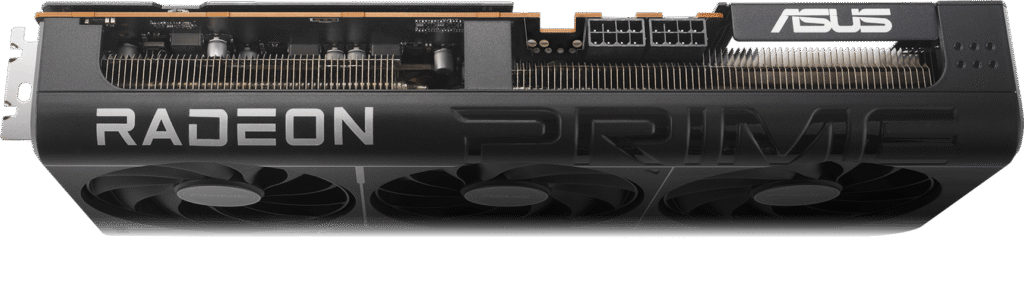
RTX 5070 vs RX 9070: quick answer
At comparable delivered prices, the RX 9070 is our starting recommendation for conventional gaming and memory headroom. Its 16GB buffer provides more room for textures and projects than the RTX 5070’s 12GB. That extra capacity is useful insurance, but it does not guarantee smooth play at every preset or prove a particular game needs more than 12GB.
Choose the RTX 5070 when the games or applications you actually use justify NVIDIA’s features, or when its price is sufficiently lower. CUDA compatibility, DLSS support and particular ray-tracing workloads can matter more than a general gaming average. Neither GPU should be purchased from its brand name alone. Compare the exact model, seller, warranty and total checkout price.
This guide compares the non-Ti RTX 5070 and non-XT RX 9070. The RTX 5070 Ti vs RX 9070 XT comparison covers the next pair up.
Choose RX 9070 if…
- Conventional 1440p gaming is your main use.
- You want 16GB for texture and project headroom.
- Its delivered price is close to the GeForce.
- Your applications support Radeon acceleration.
Choose RTX 5070 if…
- Your software requires CUDA.
- Your favourite games benefit from DLSS or specific RT effects.
- A meaningful discount outweighs the smaller buffer.
- The exact NVIDIA board better fits your build.
Specifications compared
These are GPU-family specifications, not a promise about every factory-overclocked card. Core counts, clocks and bandwidth cannot be compared across architectures as a standalone performance score. Check the board partner’s page for dimensions, power connectors and display output count.
| Specification | GeForce RTX 5070 | Radeon RX 9070 |
|---|---|---|
| Architecture | Blackwell | RDNA 4 |
| Memory | 12GB GDDR7 | 16GB GDDR6 |
| Memory interface | 192-bit | 256-bit |
| Compute hardware | 6,144 CUDA cores | 56 compute units / 3,584 stream processors |
| Reference boost | 2.51GHz | Up to 2.52GHz |
| Official board power | 250W TGP | 220W TBP |
| PCIe generation | 5.0 | 5.0 x16 |
| AV1 encoding | Supported | Supported |
| Retail board design | Founders Edition and partner cards | Partner cards |
See the exact card designs
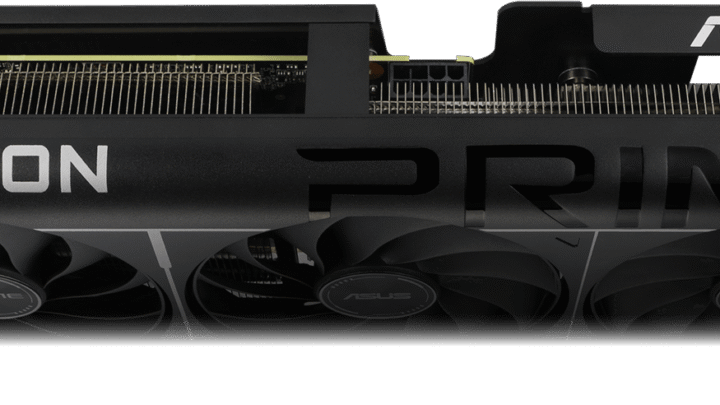
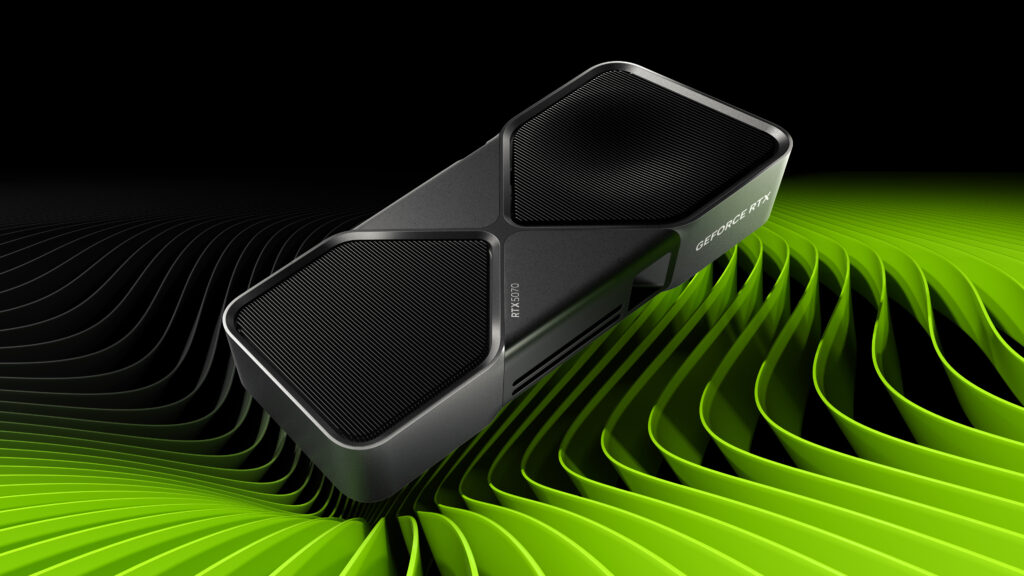
The GPU name does not identify a single cooler. These existing manufacturer images show an RTX 5070 design and an ASUS Prime RX 9070 implementation. The linked Amazon offers use ASUS TUF and Prime EVO models; confirm their full SKU and dimensions on the retailer page rather than assuming the pictured design is the exact item offered.
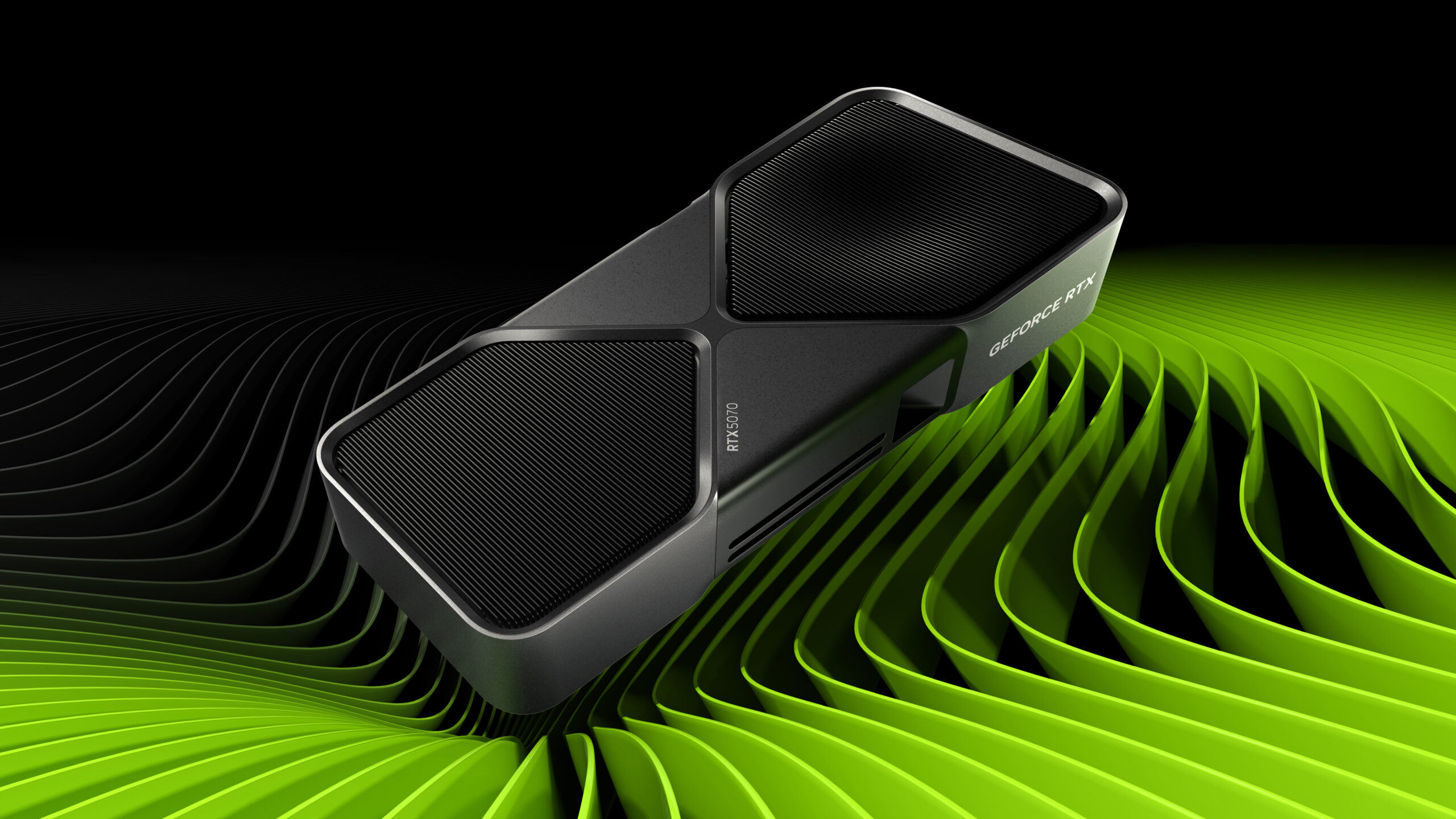
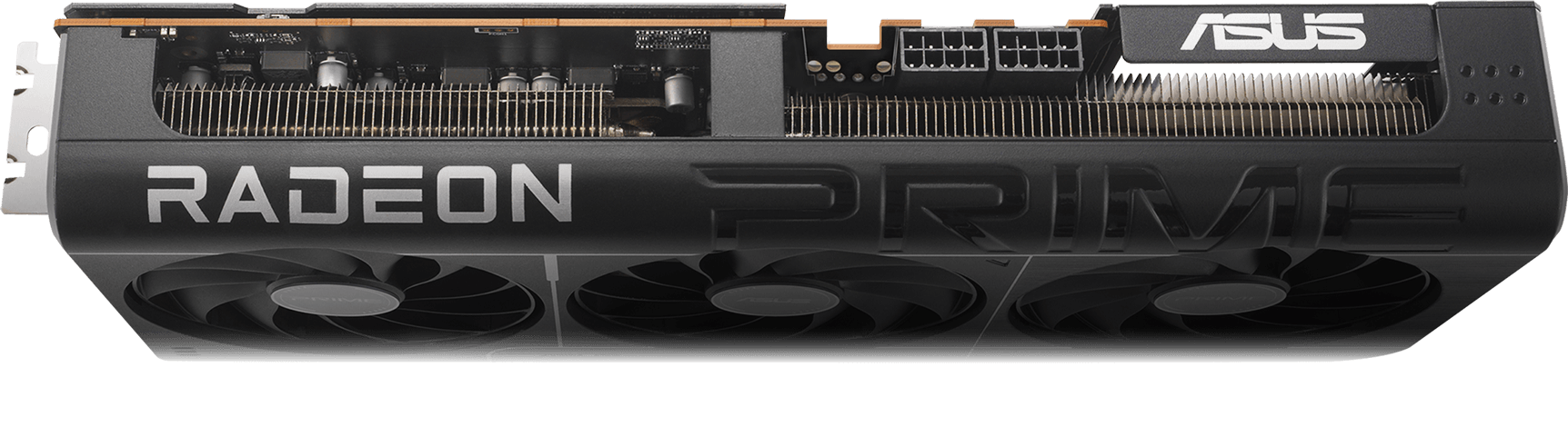
Check length, thickness, cable clearance and output layout for the exact board before buying. Manufacturer artwork illustrates the design; it does not establish a measured noise or cooling advantage.
Gaming performance: what the benchmark results show
The results below are a visual summary of the same historical TechSpot evidence used in this guide. RTX 5070 is normalised to 100 at each resolution. An index of 104 means 4% higher average performance in that particular suite, not 104 frames per second.
1440p — RTX 5070
1440p — RX 9070
4K — RTX 5070
4K — RX 9070
Original index graphic derived from TechSpot’s March 2025 18-game averages. Each resolution has its own baseline. It cannot compare absolute 1440p and 4K frame rates. Driver versions and game selection can change the outcome.
How we compare benchmark evidence
The useful unit of comparison is a matched test: the same game build, scene, resolution, quality settings, CPU platform and driver context. A frame rate taken from one review should not be divided by a frame rate from another publication to create a new performance claim. We also keep conventional rendering, ray tracing, upscaling and generated frames separate.
TechSpot’s 7 March 2025 RX 9070 review reported the Radeon averaging 4% ahead of RTX 5070 at 1440p and 8% ahead at 4K across 18 mostly raster-based games. Those are historical suite results, not a current-driver guarantee. GamersNexus’s March 2025 testing independently showed game-dependent outcomes, including Radeon raster wins and some ray-tracing losses.
We use those studies as evidence of the trade-off, not as proof of a universal winner. Their game selection, test boards and methodology differ. For a purchase driven by one demanding game, inspect recent tests of that title and your intended preset. Neither a launch average nor a manufacturer’s promotional chart substitutes for that check.
| Evidence | 1440p | 4K | Scope |
|---|---|---|---|
| TechSpot RX 9070 lead | 4% | 8% | 18-game, mostly raster suite; March 2025 |
| 5000 Series interpretation | Check favourite titles | Allow for settings compromises | Historical evidence; not our own testing |
1080p gaming: check the CPU before paying more
At 1080p, a fast CPU, memory configuration and game engine can limit performance before either GPU is fully occupied. A more expensive graphics card will not remove a CPU bottleneck. Competitive players should inspect frame-time consistency and the frame rate their monitor can display, rather than buying from a 4K average.
These are substantial purchases for a basic 1080p display. If you are choosing between them, weigh your future monitor plans and secondary workloads. A discounted card can be more sensible than paying for memory or software features you will not use. We do not invent a 1080p aggregate from the cited 1440p and 4K summary.
1440p gaming: the main buying decision
For a general 1440p build, begin with the final price and your most-played games. Check whether tests use native resolution or an upscaling mode, and whether demanding effects are enabled. A chart labelled 1440p may render internally at a lower resolution; that can be a useful real-world configuration, but it should not be mistaken for native performance.
The RX 9070’s larger buffer is attractive for buyers who keep a card for several years or use texture modifications. The RTX 5070 remains relevant when it is cheaper or delivers a feature you specifically value. A small aggregate lead does not justify ignoring a large retailer discount, poor seller reputation or an unsuitable cooler.
Look at 1% lows alongside average FPS. A fast average with uneven frame delivery can feel worse than a slightly slower, steadier result. Background applications, shader compilation and storage behaviour can affect stutter too, so not every hitch is caused by graphics memory.
4K gaming: manage quality rather than promising maximum settings
Both cards can be considered for 4K with realistic settings, but neither should be described as an unconditional maximum-quality solution. High-resolution textures, ray tracing and heavy effects can push compute and memory requirements in different directions. An older or lighter game is a different workload from a recent path-traced release.
Start with an image-quality preset you can accept, then compare native and Quality upscaling modes. Reduce expensive effects before assuming every slider must remain at its maximum. The Radeon offers more memory capacity, while the GeForce may offer a preferred reconstruction option in a particular game. Neither feature creates unlimited rendering performance.
If you want demanding 4K gaming without frequent compromises, compare the next tier as well. The additional cost only makes sense when it solves a real frame-rate or image-quality problem at your display.
12GB vs 16GB: what the extra memory changes
The RX 9070 has 4GB more VRAM, or one-third more capacity than the RTX 5070. Capacity and memory generation answer different questions: GDDR7 does not turn 12GB into a 16GB buffer, and a wider bus does not establish an automatic cross-vendor speed ranking.
Extra memory can help when a workload genuinely needs it. Possible pressure points include high-resolution texture packs, large scenes, some creator projects and combinations of effects. When memory is insufficient, symptoms can include texture compromises or uneven frame delivery. Allocation shown by a monitoring tool is not necessarily the amount a game strictly requires.
For ordinary settings that fit within both buffers, unused capacity does not directly increase frame rate. Conversely, a 12GB card is not automatically obsolete because a 16GB alternative exists. Our preference for the larger buffer at similar prices is a buying judgement about flexibility, not a guarantee about future games.
Ray tracing: choose by game and effect
Treat ray tracing as a collection of workloads. Reflections, shadows, global illumination and full path tracing impose different demands. A win in one test does not establish leadership in every game bearing an RT label. Compare the exact effects you intend to enable and the image reconstruction mode used alongside them.
The GeForce deserves a closer look when your purchase is driven by NVIDIA-specific rendering features or demanding effects with a demonstrated advantage. The Radeon should not be dismissed without checking the title. Even the faster result can need reduced settings or upscaling; a relative win is not the same thing as a comfortable absolute frame rate.
DLSS, FSR and frame generation
Both vendors offer image reconstruction and frame-generation technologies, but support depends on the game, integration, driver and feature version. NVIDIA lists DLSS reconstruction and Multi Frame Generation for the RTX 5070; AMD provides its FSR feature family for supported Radeon workloads. Check the actual game menu and current vendor compatibility information.
Evaluate image quality in motion, not just a screenshot or headline FPS counter. Fine detail, disocclusion artefacts and interface behaviour can matter. Generated frames can improve displayed smoothness, but they do not replace a responsive underlying render rate. Compare equivalent settings and keep base frame rate, latency and generated output distinct.
Do not pay a premium for a feature on the assumption that every future game will implement it. A feature is most valuable when it already improves games you play.
Power, PSU and cooling
The official ratings are 250W for RTX 5070 and 220W for RX 9070. These are different vendor metrics, not a matched measurement or an electricity-bill estimate. Board power limits, game load and factory settings can change the result. Published efficiency findings should always be read with their workload and board configuration.
AMD specifies a 650W minimum system PSU recommendation for RX 9070. For either card, check the exact model’s PSU guidance, your processor and the quality and age of the supply. Confirm connector requirements from the physical board documentation. Do not assume a connector arrangement from a different card in the same family.
A large cooler is not automatically quieter in every case. Case airflow, fan curves, ambient temperature and board power matter. Compare noise-normalised reviews of the exact card if acoustics is a priority, and check thickness, length and cable clearance before ordering.
Creator work, streaming and local AI
Check application compatibility before using gaming results to choose a work GPU. A CUDA-dependent tool can make NVIDIA the practical choice even when another card offers more memory. NVIDIA lists one ninth-generation NVENC encoder for RTX 5070; do not confuse it with the dual-encoder RTX 5070 Ti specification.
Both cards support AV1 encoding, but codec support alone does not establish export speed or quality in your software. Look for tests of the actual editor, renderer or streaming configuration. The Radeon buffer can be useful for projects that support its acceleration path, while memory capacity is less useful if the application cannot use the hardware effectively.
For local AI, check the operating system, framework, backend and model requirements. Neither the larger buffer nor a gaming benchmark guarantees that your intended model and tools will run. Application support is a separate buying gate.
Compatibility and exact-model checks
PCIe generation does not by itself require a motherboard upgrade: compatible cards can operate in older slots. Check firmware, slot arrangement and the whole build rather than matching only a number printed on the box. Ensure the monitor can use the intended resolution and refresh rate through the board’s actual outputs.
The hero uses existing NVIDIA RTX 5070 and ASUS Prime RX 9070 product imagery. It illustrates the GPU families; the exact ASUS TUF or Prime EVO board offered by a retailer may use a different cooler. Product imagery is not evidence of a measured temperature or noise advantage.
Before checkout, confirm the full model code, new or used condition, seller identity, return policy and warranty coverage in your country. Similar names can hide Ti, XT, memory or colour variations.
UK and US price and value
Live checkout prices were not independently confirmed on 26 October 2026. Our UK Amazon listing requests were inaccessible, and the retrieved US pages were cached rather than reliable live quotations. We therefore show no claimed current price or stock status. Use the retailer boxes below to inspect current offers and compare the final delivered totals.
Both cards were positioned around the same $549 US launch price. That is historical context, not today’s offer. UK pricing, VAT, US sales tax, delivery, card condition and board premiums can all change the recommendation. Avoid comparing a premium overclocked board with the cheapest basic implementation without considering the difference.
Our practical rule is to start with RX 9070 when equivalent cards cost about the same and conventional gaming is the priority. Reconsider when RTX 5070 is materially cheaper or you need its software support. If RX 9070 XT is only a small premium, compare that upgrade too rather than treating this head-to-head as the entire market.
| Price situation | Buying approach |
|---|---|
| Similar delivered prices | Start with RX 9070 for general gaming and 16GB; choose by application needs |
| RTX 5070 meaningfully cheaper | Weigh the saving against memory capacity and your games |
| RX 9070 more expensive | Calculate whether its benefits justify the actual premium |
| RX 9070 XT close in price | Compare the step up before committing |
Which card should you buy?
Choose RX 9070 for a balanced gaming-first build at a competitive price. It is the default we would investigate first when both cards cost similarly, especially for a buyer seeking more graphics-memory flexibility.
Choose RTX 5070 for a specific NVIDIA workflow or a convincing discount. CUDA requirements, preferred DLSS implementations and verified results in your favourite games can outweigh the memory difference.
Choose neither when the listings are poor value. Compare RX 9070 XT, RTX 5070 Ti and lower-priced alternatives against your actual budget. Do not spend more simply because two premium partner cards happen to be the listings available.
Retailer offers
Where to buy the NVIDIA GeForce RTX 5070 and AMD Radeon RX 9070
Compare current retailer availability for each card. Prices can change, so confirm the final total before buying.
NVIDIA GeForce RTX 5070
NVIDIA GeForce RTX 5070 offers
Prices and availability are checked manually and may change. Confirm the final price with the retailer before buying.
Affiliate disclosure: We may earn a commission from qualifying purchases made through marked links, at no extra cost to you.
United Kingdom
-
Amazon UK — ASUS TUF RTX 5070 OC Affiliate link Availability not confirmedCheck retailer for current price Last checkedCheck current price at Amazon UK (opens in a new tab)
United States
-
Amazon US — ASUS TUF RTX 5070 OC Affiliate link Availability not confirmedCheck retailer for current price Last checkedCheck current price at Amazon US (opens in a new tab)
International / other
-
Scan UK Availability not confirmedCheck retailer for current price Last checkedCheck UK price (non-affiliate) (opens in a new tab)
-
Overclockers UK Availability not confirmedCheck retailer for current price Last checkedCheck UK price (non-affiliate) (opens in a new tab)
-
Newegg US Affiliate link Availability not confirmedCheck retailer for current price Last checkedCheck current price at Newegg (opens in a new tab)
-
B&H Photo Video Availability not confirmedCheck retailer for current price Last checkedCheck US price (non-affiliate) (opens in a new tab)
AMD Radeon RX 9070
AMD Radeon RX 9070 offers
Prices and availability are checked manually and may change. Confirm the final price with the retailer before buying.
Affiliate disclosure: We may earn a commission from qualifying purchases made through marked links, at no extra cost to you.
United Kingdom
-
Amazon UK — ASUS Prime RX 9070 16GB OC EVO Affiliate link Availability not confirmedCheck retailer for current price Last checkedCheck current price at Amazon UK (opens in a new tab)
United States
-
Amazon US — ASUS Prime RX 9070 16GB OC EVO Affiliate link Availability not confirmedCheck retailer for current price Last checkedCheck current price at Amazon US (opens in a new tab)
International / other
-
Scan UK Availability not confirmedCheck retailer for current price Last checkedCheck UK price (non-affiliate) (opens in a new tab)
-
Overclockers UK Availability not confirmedCheck retailer for current price Last checkedCheck UK price (non-affiliate) (opens in a new tab)
-
Newegg US Affiliate link Availability not confirmedCheck retailer for current price Last checkedCheck current price at Newegg (opens in a new tab)
-
B&H Photo Video Availability not confirmedCheck retailer for current price Last checkedCheck US price (non-affiliate) (opens in a new tab)
Final verdict
RX 9070 is our conditional pick for general gaming at similar delivered prices, with 16GB as its clearest specification advantage. RTX 5070 makes sense when its price or NVIDIA-specific software benefits better match your needs. The benchmark evidence cited here is historical; check your games and current retailer totals before buying.
Questions buyers ask
Is RX 9070 the same as RX 9070 XT? No. This guide covers the non-XT card. Verify the complete model name in the listing.
Is RTX 5070’s 12GB enough for 1440p? It can be suitable, but requirements vary by game, texture settings and effects. We do not claim every current or future maximum preset fits.
Does 16GB make RX 9070 one-third faster? No. It has one-third more memory capacity, not a guaranteed one-third performance advantage.
Which is better for ray tracing? Use matched tests for the specific game and preset; effects and reconstruction support vary.
Are the buy buttons affiliate links? Marked Amazon and Newegg links can earn commission at no additional cost. The retailer sections disclose this and open in a new tab.
Have we tested either card ourselves? No. This guide combines cited manufacturer specifications, independent benchmark evidence and our editorial buying advice.
Research and sources
Specifications: NVIDIA RTX 5070 family and AMD RX 9070. Independent tests: TechSpot RX 9070 review (7 March 2025) and GamersNexus RX 9070 review (March 2025). Manufacturer product images retain their respective owners’ rights; no third-party benchmark artwork is reproduced.
Sources reviewed 26 October 2026. Test dates are stated separately from this editorial review date. Retail availability is unconfirmed. We do not combine separate laboratories into an invented aggregate.
Related guides and product details
Choosing between the two Radeons? Read our RX 9070 vs RX 9070 XT comparison for matched gaming evidence, power requirements and the extra price worth considering for XT.
- Read the individual reviews: RTX 5070 review and RX 9070 review.
- Check specifications and retailer options: RTX 5070 product page and RX 9070 product page.
- Compare the next tier: RTX 5070 Ti vs RX 9070 XT.
- Explore a lower-cost comparison: RTX 5060 Ti 16GB vs RX 9060 XT 16GB.